
The generative media landscape has shifted from a state of wonder to one of utility. A year ago, simply seeing a static portrait blink was enough to warrant a viral thread. Today, creators and marketers are less concerned with the “magic” and more focused on the friction of the workflow. When evaluating new tools, the standard comparison matrix—usually a checklist of price, resolution, and clip length—is becoming increasingly obsolete. It fails to capture the nuance of how these models actually behave under the pressure of a real production schedule.
To truly compare generative tools, we have to look past the marketing hero reels. We need to evaluate them through a practical lens: motion fidelity, temporal consistency, and the granular control of the latent space. Whether you are using a dedicated Photo to Video AI or a broader suite of generative models, the goal isn’t just to make something move; it is to make it move with intent.

Moving Beyond the Feature Checklist
Traditional reviews often focus on “features” because they are easy to count. Does it have a brush tool? Does it support 4K? While these are important, they don’t tell you if the tool will ruin a character’s face during a simple pan shot. The real differentiator in the current market is how a tool interprets the underlying geometry of an image.
When we talk about Photo to Video, we are essentially talking about the AI’s ability to “hallucinate” the missing frames between a static state and a hypothetical future state. Some tools do this by applying a generic layer of motion—think of it as a “wiggle” filter—while others attempt to understand the depth and volume of the objects in the frame.
For a creator, a tool that lacks 4K export but maintains perfect facial structure is infinitely more valuable than a high-resolution tool that suffers from “melting” artifacts. When comparing tools, the first question should not be “What can it do?” but rather “What does it break when it tries?”

Motion Fidelity and the Logic of Movement
One of the most difficult things for any Image to Video AI to master is the logic of physics. In many generated clips, you will see hair that flows in two different directions or a background that warps as the camera moves. This is where the comparison becomes technical.
High-quality models attempt to maintain the “weight” of an object. If you upload a photo of a heavy car, the motion should feel sluggish and grounded. If the AI treats that car like a feather, the immersion is broken immediately. This is a common limitation in the current generation of tools: they often lack a true physics engine. They are predicting pixels, not mass. Because of this, creators must often run multiple generations (seed hunting) to find one where the motion doesn’t defy gravity in a distracting way.
The Challenge of Human Anatomy
Despite the rapid progress in the field, we have to acknowledge a persistent limitation: complex human biomechanics. If your workflow involves a person walking toward the camera or performing intricate hand gestures, even the most advanced Image to Video workflows will likely struggle. We are still in an era where “the walk” is the ultimate stress test. Most models will default to a sliding motion or “leg-crossing” artifacts that look like a glitch in the matrix. Until there is a breakthrough in skeletal-guided generation, this remains a significant hurdle for those looking for hyper-realism.
Control vs. Automation: The Creator’s Dilemma
There is a tension in the AI space between “one-click” simplicity and professional-grade control. Marketers often prefer the former—they need a high volume of social content and don’t have time to tweak motion brushes for four hours. Indie filmmakers, however, need the latter.
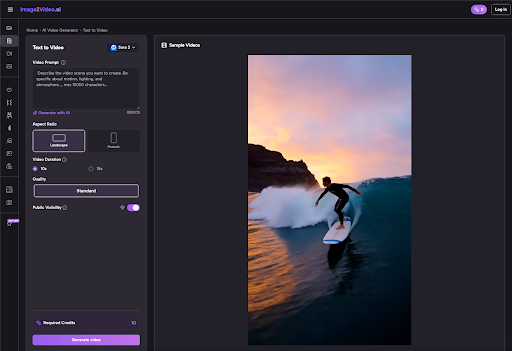
When evaluating a Photo to Video AI, look at the input parameters. Does the tool allow you to specify the “Motion Bucket” or “Motion Scale”? Can you guide the camera with specific prompts like “dolly zoom” or “low-angle tilt”?
A tool that offers too much automation often results in a “generic AI look.” This look is characterized by a slow, floating zoom that happens regardless of the image content. Conversely, tools that require heavy prompting can be frustrating for those who just want to bring a product photo to life for an Instagram ad. The best tool in your stack is the one that matches your specific need for agency over the final pixels.
Workflow Integration and Latency
For a professional, the “output” is only half the story. The other half is the “iteration loop.” If a tool takes ten minutes to generate a four-second clip, and that clip turns out to be unusable because of a warped limb, you have lost ten minutes of productivity.
This is why “preview” features are becoming a standard for the industry. Some platforms allow you to see a low-resolution storyboard or a “wireframe” of the motion before you commit credits or time to a full render. In a high-pressure environment, a tool with a 30-second preview loop is far superior to a “black box” model that keeps you guessing until the render is 100% complete.
We must also be realistic about the “infinite” nature of AI. There is a common misconception that because it is AI, it can generate anything. In reality, every model has a “latent bias.” Some are trained heavily on cinematic film, making them great for moody landscapes but terrible for bright, clean corporate headshots. Knowing the “personality” of your tool is just as important as knowing its technical specs.
The Role of Style Consistency
If you are building a brand, you cannot have one video that looks like a Pixar movie and another that looks like a gritty documentary. The ability to lock in a style across multiple generations is a massive competitive advantage.
When you use Photo to Video techniques, you are essentially asking the AI to respect the source material. However, many models have a tendency to “over-beautify” or change the art style of the original photo. If you upload a grainy, 35mm film photograph, and the AI returns a hyper-clean, digital-looking video, it has failed the consistency test. The best tools are the ones that serve as a transparent extension of your original vision, rather than imposing their own aesthetic onto your work.
Limitations in Spatial Awareness
Another area where uncertainty remains is spatial awareness. If a photo features a glass of water on a table, the AI might understand that the water should splash, but it might not understand that the glass is transparent. You often see “ghosting” where the background is visible through solid objects or where objects merge into one another. This is an inherent limitation of 2D-to-3D projection in generative models. We are seeing improvements, but creators should always expect a certain level of manual “cleaning” in post-production.
Final Thoughts for the Operator
Choosing the right tool isn’t about finding the one with the most “likes” on social media. It’s about identifying which part of the production process is currently your biggest bottleneck.
If your bottleneck is the transition from a static asset to a social-ready clip, a streamlined Image to Video AI is the logical choice. It bypasses the complexity of text-to-video, where you often spend hours fighting a prompt to get the exact framing you already have in a photo.
By focusing on motion fidelity, temporal consistency, and workflow speed, you move away from being a “prompt engineer” and back toward being a director. The tools are getting better, but the human eye for “wrong” physics and “uncanny” movement remains the most important filter in the process. When you compare your next set of tools, ignore the marketing fluff and look at the frames—the truth of the model is always hidden in the motion between the pixels.